


Product Details
1. This product is a low-voltage SPI controller, the standard product supply voltage is 12-24V;
2. Four groups of SPI signal output ports (three-wire digital led strip), which can control up to 2048 pixels;
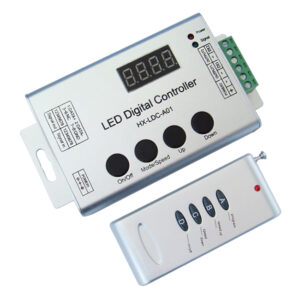
3. With digital tube and control buttons, it can also be used with RF remote control for mode selection, speed and IC point adjustment;
4. With power-off memory storage function;
5. Contains 136 effect modes, including horse racing, running water, trailing, color brushing, scanning, raindrops and other effects. The 135th mode is the 8-134th automatic cycle mode, and the 136th is the custom combination mode;
6. The controllers can realize multiple synchronous changes through shielded wire connection;
7. The remote control has 4 areas of overall control or independent control functions
8. This product is guaranteed for three years, excluding man-made damage, improper operation, overload short circuit or force majeure factors.
Technical Parameters:
Controller:
| Working temperature | -20-60℃ | Working voltage | DC12-24V |
| Static consumption | <1W | RF frequency | 2.4GHz |
| Gray level | 256 | Speed level | 99 |
| N. weight | 100g | G. weight | 130g |
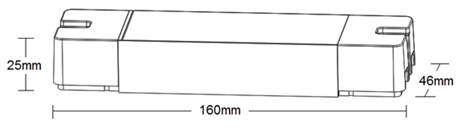
| Dimension | L160*W46*H25 mm | Packing size | L170*W50*H29 mm |
| Output signal | 4 groups SPI | Max. control points | 2048 |
| RF distance | ≤20m | Modes | 136 |
| Memory function | Yes | Sync-work function | Yes |
| Compatible ICs | UCS1903、WS2811、TM1804、SM16703、17822、ICP943 | ||
Remote control:
| Working temperature | -20℃~60℃ | Supply voltage | DC3V(AAA*2) |
| Standby current | <18uA | Working current | <25mA |
| Standby power | 54uW | Working power | 75mW |
| Net weight | 95g | RF frequency | 2.4GHz |
| External dimension | L150*W40*H20 mm | RF distance | ≤20m |
Dimension
Connection ports
Instructions for use
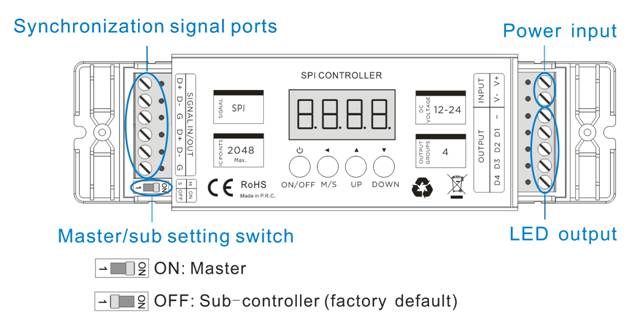
- Determine the controller is the master or the sub-controller, and set the DIP switch at the right position, master-ON, sub-controller- OFF;
- Connecting the load led strip at first, then connect the power input wires; and make sure that there is no short circuit between the connecting wires before powering on;
- The functions of the 4 buttons on the controller are as follows:
| Button | Function description |
| ON/OFF | Turn on/off |
| M/S |
Switch Mode/speed/brightness adjustment functions Mode adjustment: digital tube display H*** (*** is 000-136, 000 is displayed when controlled by the touch ring on the remote control) Speed adjustment: the digital tube displays S-** (*** is 01-99), the speed adjustment function is only valid for dynamic mode Brightness adjustment: the digital tube displays d*** (*** is 001-100), the brightness adjustment function is only valid for static mode |
| UP | Mode+/Speed+/Brightness+, adjust the object according to the setting result of M/S. |
| DOWN | Mode-/Speed-/Brightness-, adjust the object according to the setting result of M/S. |
- control IC number setting
In the off state (the controller needs to be powered on), long-press the “UP” and “DOWN” keys at the same time for two seconds, the digital tube displays **** (0010-2048, the current IC point number ) and then enters the control IC number setting interface , Press “UP”/ “DOWN” to increase/reduce the control IC number. After the setting is completed, press the “ON/OFF” key to save and exit.
- Custom combination mode settings
This mode is a free combination mode. Choosing 2-20 modes from the 1-134th mode and combine them into a cyclic mode, and each mode can set an independent change speed.
Step 1: In the off state, long-press the “M/S” and “Up” buttons at the same time for 2 seconds to enter Custom combination mode settings, the digital tube will light up and display “-**-“, “-**-” represents the currently edited scene number. Please use the “UP” / “DOWN” keys to select the scene number to be edited. For example, we will set a custom combination mode with 5 modes.
Step 2: Setting the mode for -01-. Press “M/S” after Step 1 “-01-“, the digital tube will display “H***”. Please use the “UP” / “DOWN” keys to select the needed mode from 1-134th for “-01-“. If the digital tube displays “H000”, mean there is no effect was set to current scene.
Step 3: Setting the speed for -01-. Press “M/S” after Step 2, the digital tube will display “S-**”. Please use the “UP” / “DOWN” keys to select the needed speed from 01-99 for “-01-” mode. The status of loading led strips will be changed accordingly.
Press “M/S” after Step 3, the digital tube will display back to “-01-“. Please press “UP” / “DOWN” keys to select the next edited scene number, and repeat the operation like step2 and step 3 to finished the all other 5 scenes from 2nd to 6th. And press the “ON/OFF” key to save and exit in the end.
Important notes: When there are less than 20 scenes set, the scene should start from -01- the first number (because the 136th mode runs from scene “01”), and the scenes without effect need to be set to “H000”. Like example that we set 5 scenes to combinate the 136th mode, enter the edit menu and edit the respective modes and speeds of scenes “-01-” to “-05-” (can be not in order during the editing operation). After editing, please check the mode of scene “-06-” should be “H000”, if not, please correct it by the “UP”/”DOWN” keys.
- Synchronization function
The synchronization control function can be formed by connecting up to 32 controllers, all controllers follow the first master control to achieve synchronous changes without delay.
After all the controllers are connected according to the wiring diagram (please make sure the position of the DIP switch of the master and the sub-controller is correct), just turn on the master, and the sub-controllers will change according to the speed and mode of the master. The green signal light on the sub-controller will flash in normal working statues.
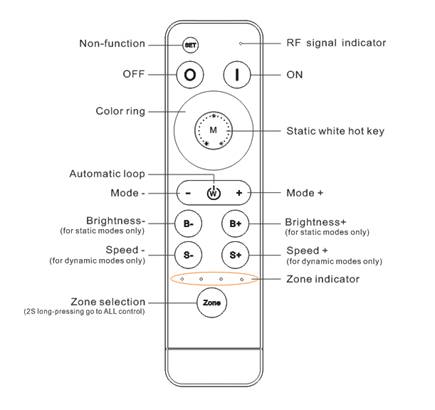
Remote control: RFBK-RGB-2.4G
| Button | Function description |
 |
Non-function |
 |
ON |
 |
OFF |
| Color ring | Static color options, 64 colors in total, digital tube will display “H000”,brightness is adjustable by B+/B-. |
 |
Static white color hotkey, digital tube will display “H007” |
 |
Automatic loop hotkey, digital tube will display “H135” |
 |
Mode down (136 modes in total). Long-press can get fast adjusting. |
 |
Mode up (136 modes in total). Long-press can get fast adjusting. |
 |
Brightness – for static colors by 100 levels. Long-press can get fast adjusting. |
 |
Brightness + for static colors by 100 levels. Long-press can get fast adjusting. |
 |
Speed down for dynamic mode (100 levels). Long-press can get fast adjusting. |
 |
Speed up for dynamic mode (100 levels). Long-press can get fast adjusting. |
 |
Zone selection, 2 seconds long-press get “all-control”. |
Mode table
| No. | Mode description | No. | Mode description |
|---|---|---|---|
| 1 | Static Red | 2 | Static Green |
| 3 | Static Blue | 4 | Static Yellow |
| 5 | Static Purple | 6 | Static Cyan |
| 7 | Static White | 8 | 3 color jumping |
| 9 | 7 color jumping | 10 | 7 color flashing |
| 11 | 7 color fading | 12 | Red horse race-right |
| 13 | Blue horse race-right | 14 | Purple horse race-right |
| 15 | Orange horse race-right | 16 | White horse race-right |
| 17 | Cyan horse race-right | 18 | Cyan horse race-left |
| 19 | 7 color horse race-right | 20 | 7 color horse race 2 direction |
| 21 | White 1-pixel horse race-right I | 22 | Red 1-pixel horse race-right I |
| 23 | Green 1-pixel horse race-right I | 24 | Blue 1-pixel horse race-right I |
| 25 | White 1-pixel horse race-right II | 26 | Red 1-pixel horse race-right II |
| 27 | Green 1-pixel horse race-right II | 28 | Blue 1-pixel horse race-right II |
| 29 | White 3-pixel horse race-right | 30 | Red 3-pixel horse race-right |
| 31 | Green 3-pixel horse race-right | 32 | Blue 3-pixel horse race-right |
| 33 | White 5-pixel horse race-right | 34 | Red 5-pixel horse race-right |
| 35 | Green 5pixel horse race-right | 36 | Blue 5-pixel horse race-right |
| 37 | Red and white chasing(right) | 38 | Red, white, blue chasing(right) |
| 39 | Orange and purple chasing(right) | 40 | Orange and blank chasing(right) |
| 41 | Green and white chasing(right) | 42 | Blue and white chasing(right) |
| 43 | Red and yellow chasing(right) | 44 | Orange and blue chasing(right) |
| 45 | Red and blue chasing(right) | 46 | Blue, purple, yellow chasing(right) |
| 47 | Red and green chasing(right) | 48 | Blue and green chasing(right) |
| 49 | Pink and purple chasing(right) | 50 | Yellow and green chasing(right) |
| 51 | Red, yellow, green chasing(right) | 52 | Yellow chasing(right) |
| 53 | Cyan and white chasing(right) | 54 | Cyan and purple chasing(right) |
| 55 | Blue, purple, yellow floating | 56 | Red, green, white floating |
| 57 | Orange, yellow, red floating | 58 | Red, pink floating |
| 59 | Red, white floating | 60 | Blue, white floating |
| 61 | Green, white floating | 62 | All color floating |
| 63 | White random twinkle strobe | 64 | Red running water I |
| 65 | Green running water I | 66 | Blue running water I |
| 67 | Yellow running water I | 68 | Purple running water I |
| 69 | Cyan running water I | 70 | White running water I |
| 71 | Orange running water I | 72 | Cyan trailing right I |
| 73 | Cyan trailing right II | 74 | Cyan trailing left |
| 75 | Running back and forth with Cyan | 76 | Running back and forth with Purple |
| 77 | Red running water II | 78 | Green running water II |
| 79 | Blue running water II | 80 | Yellow running water II |
| 81 | Purple running water II | 82 | Cyan running water II |
| 83 | White running water II | 84 | 7-color running water II |
| 85 | Cyan trails water to the right I | 86 |
Related products
|
Reviews
There are no reviews yet.