



Product Details
1) Working voltage: AC90-265V, 50/60Hz;
2) RF frequency: 2.4GHz;
3) WIFI controlled by TUYA application.
4) Used for translating WIFI signal to RF 2.4GHz signal, compatible with Hoion smart lighting system.
5) 3 years warranty.
Technical Parameters
| Working temperature | -20-60℃ | Working voltage | AC90-265V,50/60Hz |
| Sleep current | 0.014A(230V) | Emission current | 0.022A(230V) |
| Sleep power consumption | 1.4W(230V) | Emission power consumption | 2.2W(230V) |
| Net weight | 35g | Dimension | L51*W52*H25(mm) |
| RF distance | ≤30m | RF frequency | 2.4GHz |
| WIFI application | TUYA | ||
Buttons:
K1: Long pressing 5 seconds to start the connecting with TUYA APP.
K2: Long pressing 5 seconds to copy the RF code from other remote control.
K3: Long pressing 5 seconds to clear the RF code of receivers.
K4: Long pressing 5 seconds to pair the RF code to un-coded receivers.
(please find the operation instructions in below RF CODE part)
Indicator light:
For WIFI- green: will light up after linking with WIFI APP
For RF-red: will light up/ flash according to the state.
Compatibility and application
Direction for use
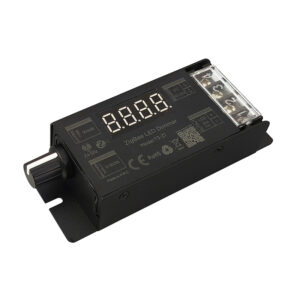
Designed for translating TUYA APP WIFI signal to RF 2.4GHz wireless signal, compatible with Hoion smart lighting system. Contains single color version and dual-white version.
System setting
1) Pairing receiver with TUYA-2.4G converter by K4 button.
| Step | Operation | Instructions |
| 1 | Connecting the load to the receiver and power on it. |
1.It is necessary to clear the code first, if the receiver was coded before. 2.Batch operation can be performed within the remote control range. 3. Please remember to cut off other un-code zones power, or will be paired together. |
| 2 | Press and hold “K4” on the TUYA-2.4G converter for 5 seconds | The indicator of the TUYA-2.4G converter will flash quickly, see the load light flashes 3 times and return to the initial state, means matching coding is finished successfully |
| 3 | Press any key to exit and end the operation | Also will automatically exit code transmission status after 60 seconds |
Tips: If also using RF remote control, please pair the receivers with RF remote control at first (Please find the operation instructions from RF remote control manual). And then copy RF code from the RF remote control with K2 button. The operation as below:
Step 1. Main remote control: Press and hold corresponding key for 5 seconds. The indicator of the remote control will flash quickly, means it enters the pairing code transmission status.
Step 2. TUYA-2.4G converter: Press and hold “K2” key for 5 seconds, indicator will turn from 100% to off means it enters learning code status.
Step 3. Indicator of TUYA-2.4G converter flash 3 times after successful code learning.
2) Linking TUYA-2.4G converter with Tuya Application to achieve smart control like group control, scene control, timer control and so on.
Scan QR code from controller to download Tuya application: (Tuya).
Long pressing “K1” button on TUYA-2.4G converter and hold for 5 seconds until WIFI-green indicator light flashing to start the connection with Tuya APP. Please read operation instruction of App, or following the pop-up prompt message with the APP, to finish the rest connection operation.
And compatible with voice control via Amazon Alexa, Google Assistant, Yandex Alice and so on.
Installation
TUYA-2.4G converter is compatible with full range smart lighting system from Hoion.
It can be put into EU86 plastic back housing for connection and installation.
RF code value setting method
The number of controllers and remote controls in one system is unlimited. 2.4G Smart system has one unique RF code for communication. Each controller and each remote control can remember only one RF code, recorded in the first programing. New RF code can be recorded after delete the old one.
Code matching operation: the receiver will only be controlled by the value code remote control.
| Step | Operation | Instructions |
| 1 | Connecting the load to the receiver and power on it. |
1.It is necessary to clear the code first, if the receiver was coded before. 2.Batch operation can be performed within the remote control range. 3. Please remember to cut off other un-code zones power, or will be paired together. |
| 2 | Press and hold “K4” on the remote control for 5 seconds | The indicator of the remote control will flash quickly, see the load light flashes 3 times and return to the initial state, means matching coding is finished successfully |
| 3 | Press any key to exit and end the operation | Also will automatically exit code transmission status after 60 seconds |
| Step | Operation | Instructions |
| 1 | Connecting the load to the receiver and power on it. |
1. The clearing operation should be finished within 1 minute after the receiver is powered on. 2. Batch operation can be performed within the remote control range. |
| 2 |
Press and hold
Related products
|
Reviews
There are no reviews yet.